Resume Keywords That Help You Pass ATS Screening – The 2026 Guide
Introduction: Your Resume's First Reader Isn't Human
You've spent hours perfecting your resume. You've highlighted your achievements, polished the formatting, and double-checked every detail. You hit "submit" with confidence. And then… nothing. No callbacks. No interview invites. Just silence.
Here's the truth that most candidates don't realize: your resume's first reader probably isn't a human. Before a recruiter ever lays eyes on your application, an Applicant Tracking System (ATS) has already scanned it, scored it, and decided whether you're worth a second look.
The ATS is like a massive filing cabinet for recruiters. When they need to find candidates, they don't read every resume—they search. Just like Google, they use filters and keywords: "Python AND data analysis," "SAFe AND agile transformation," "Tableau AND executive dashboards." If your resume doesn't include the exact terms they're searching for, you're invisible—not rejected, just not discovered.
But here's the good news: with the right strategy, you can make sure your resume gets found. This guide will show you exactly how to identify, place, and use keywords to pass ATS screening and land in front of hiring managers.
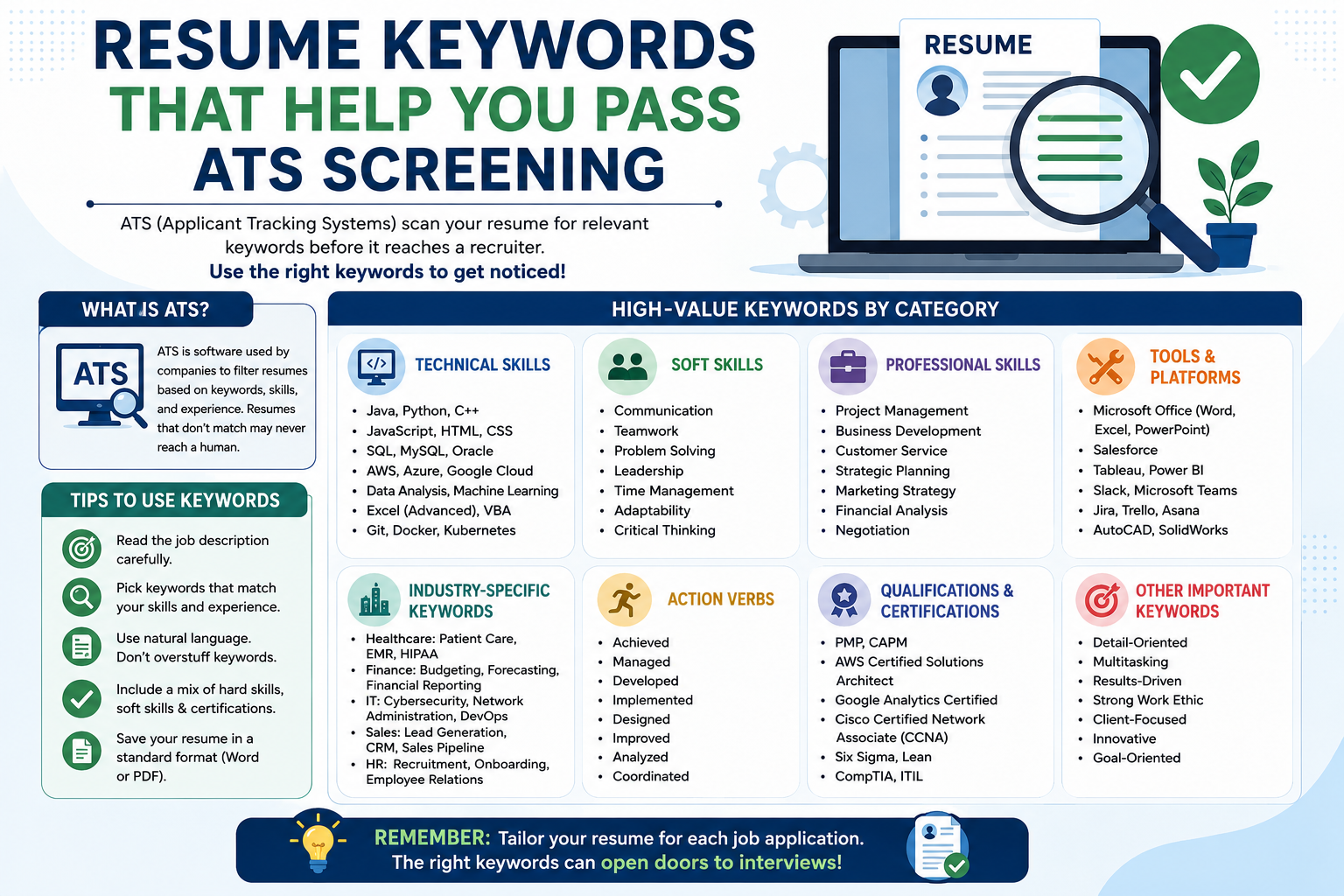
Chapter 1: How ATS Actually Works in 2026
Modern ATS systems have evolved far beyond simple keyword matching. They now use natural language processing (NLP) and pattern recognition to identify resumes that not only match keywords but also demonstrate performance.
The 6-Second Reality: Before a human recruiter even looks at your resume, the ATS has likely already decided if you're worth the glance. This is why formatting and keywords matter so much.
What ATS Is Looking For:
| Factor | Why It Matters |
|---|---|
| Exact Keyword Matches | ATS searches for specific terms from the job description |
| Impact Metrics | Numbers signal competence and effectiveness |
| Proper Formatting | Fancy designs confuse the system |
| Context | How you used skills matters more than just listing them |
Chapter 2: Identifying the Right Keywords – Your Step-by-Step Guide
The job description is your answer key. It tells you exactly what the ATS will search for. Here's how to extract the right keywords:
Step 1: Read the Job Description Carefully: Examine every section. Note the stated requirements, years of experience, key duties, responsibilities, and qualifications. Pay attention to anything repeated or emphasized throughout the listing—these are almost always core keywords.
Step 2: Look for Single Words First: Check the job title, exact experience requirements, specified skills, qualifications, certifications, and software. Create a list of keywords based on this analysis.
Step 3: Search for Short Phrases: These multi-word phrases are critical because ATS often scores them as exact matches. Examples include: Cross-functional collaboration, Process improvement, Change management, Data analysis, Project management.
Step 4: Identify Action Verbs: When reviewing the responsibilities, note action verbs such as directed, created, analyzed, developed, and managed.
Step 5: Spell Out Acronyms (At Least Once): ATS systems aren't as smart as humans when it comes to interpreting abbreviations. If you write "MS Excel," it might miss the fact that you're proficient in Microsoft Excel. The fix? Spell out acronyms at least once and then include the short form: "Microsoft Excel (MS Excel)" or "Search Engine Optimization (SEO)."
Step 6: Use an AI Tool for Insights: Use an AI chatbot tool, such as ChatGPT, Gemini, or Perplexity.ai, and ask it to provide insights into the company and department, as well as conduct an in-depth evaluation of the role.
Chapter 3: Where to Place Keywords – The Strategic Approach
It isn't enough to identify the right keywords; you also need to place them where the ATS and recruiters expect to see them.
| Section | How to Use Keywords |
|---|---|
| Professional Summary | Weave in the core experience and must-have skills so they show up early |
| Skills Section | List technical tools, software, and industry-specific terms in a clear, concise way |
| Experience Bullets | Incorporate keywords naturally into accomplishment statements |
| Certifications & Education | Spell out the names of licenses, degrees, credentials, and certifications |
| Job Titles | Consider carefully aligning titles to match the role |
Example: Before and After
Same experience. Very different outcome. The second version includes keywords like "SAFe," "agile transformation," "ServiceNow," and "Jira" while also showing measurable impact.
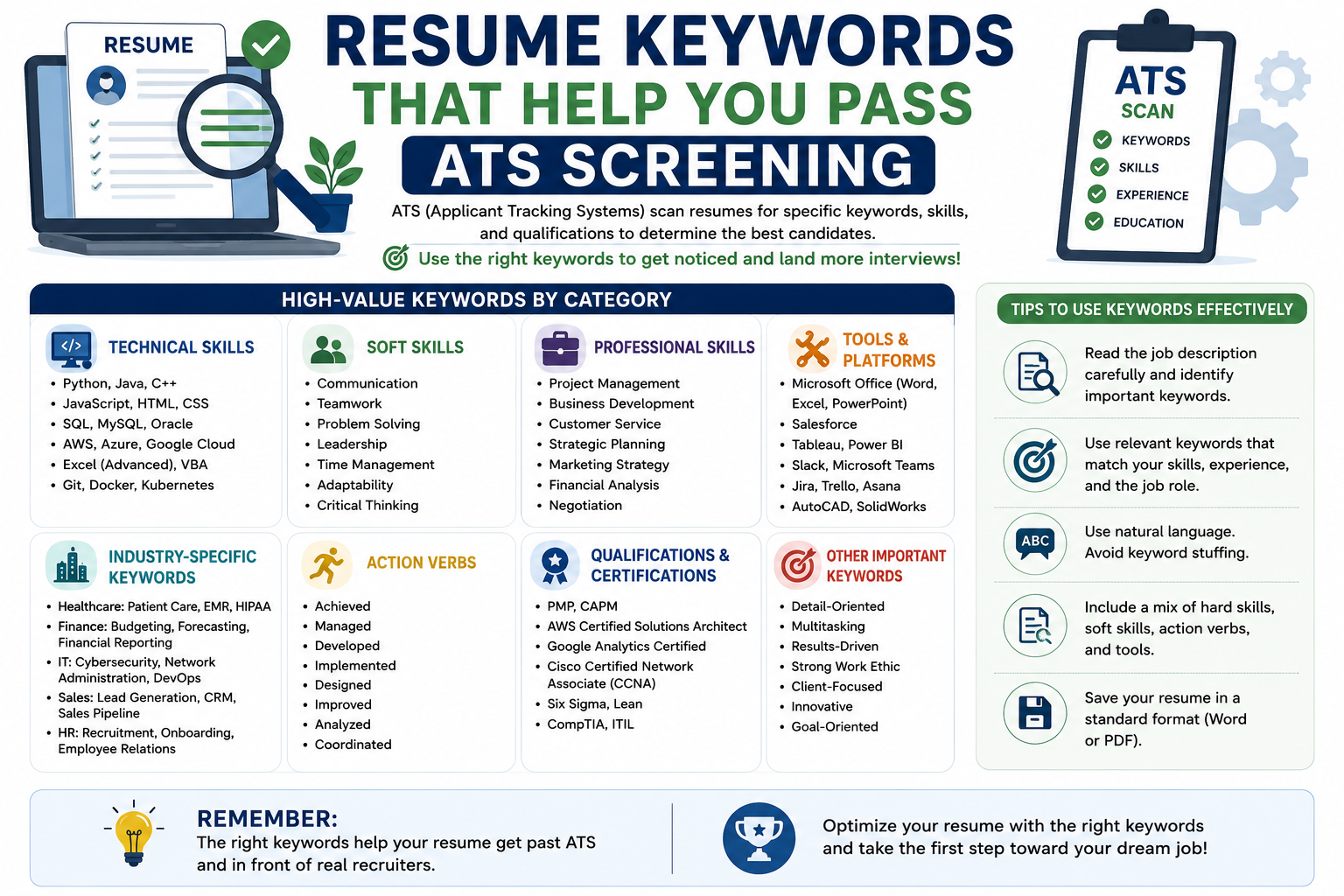
Chapter 4: The Power of Impact Metrics – Numbers Matter Most
In 2026, the most critical factor for passing automated filters is emphasizing impact metrics—dollar values, percentages, or volume-based outcomes. The newest generation of ATS platforms uses NLP to identify resumes that demonstrate performance, not just activity.
Why Metrics Work:
- Keywords alone might get you seen, but impact metrics signal effectiveness
- Resumes with quantifiable metrics were 48% more likely to be ranked in the top third by AI-based screeners
- Numbers help ATS and recruiters understand your value quickly
Examples of Impact Metrics:
| Weak (Activity) | Strong (Achievement) |
|---|---|
| "Assisted in social media management" | "Managed Instagram content calendar and increased engagement by 27% in 3 months" |
| "Worked on customer support" | "Resolved 40+ tickets/day with 98% satisfaction" |
| "Helped with data analysis" | "Reduced latency by 30% through code optimization" |
What Recruiters Look For:
- Performance improvements: "Reduced latency by 30%"
- Scale: "Managed 500+ customers"
- Reliability: "Ensured 99.6% service uptime"
- Cost savings: "Saved 20% on cloud infrastructure"
Chapter 5: Common Keyword Mistakes to Avoid
| Mistake | Why It's a Problem | What to Do Instead |
|---|---|---|
| Keyword Stuffing | Overloading your resume with too many keywords can be spotted by ATS, which can filter out your resume | Weave keywords naturally into sentences. ATS systems are designed to detect unnatural stuffing |
| Using Generic Terms | Terms like "team player" or "innovative" don't move the needle | Use specific, role-required keywords from the job description |
| Missing Exact Matches | If the job says "customer service" and you say "client relations," the system may not recognize the connection | Mirror the employer's language exactly |
| Ignoring Preferred Keywords | Treat "preferred" the same as "required." The most essential keywords to highlight are required | Prioritize required skills in your keywords list |
| Using Only Single Words | Keyword phrases matter too | Include multi-word phrases like "cross-functional collaboration" |
| Forgetting Abbreviations | ATS may not recognize "RA" as "Resident Assistant" | Spell out acronyms at least once, then include the abbreviation |
Chapter 6: Formatting for ATS Success
Even the best keywords won't help if your resume can't be parsed. Here's how to format properly:
• Use a single-column layout
• Stick to fonts like Arial, Calibri, or Times New Roman
• Use standard section headings (Experience, Education, Skills)
• Use standard bullet points (•, -, or *)
• Use bold headings for clarity
• Save as a .docx file unless PDF is requested
• Use tables, text boxes, or multiple columns
• Use fancy or unusual fonts
• Use creative section names like "Career Journey"
• Use arrows, checkmarks, or special characters
• Use images, icons, or logos
• Use headers or footers for important information
Chapter 7: Tailoring Your Resume for Each Job
A one-size-fits-all resume rarely works. Each job has unique requirements, and ATS systems are designed to identify those matches.
The 10-Minute Tailoring Process:
| Step | Time | Action |
|---|---|---|
| 1. Highlight Keywords | 2 min | Read the job posting, highlight required skills and qualifications |
| 2. Update Skills Section | 3 min | Add keywords you honestly possess, order by relevance to this role |
| 3. Adjust Summary | 2 min | Include the job title from the posting, mention 2-3 key requirements |
| 4. Tweak Achievement Bullets | 3 min | Add keywords where natural, reorder bullets by relevance |
What NOT to Change: Don't lie about skills or experience, don't add certifications you don't have, and don't change dates or job titles.
Chapter 8: The 2026 Keyword Landscape by Industry
Python, TensorFlow, LangChain
Kubernetes, Terraform, Docker, AWS, Azure, GCP
Power BI, Tableau, SQL, data analysis
SAFe, Agile, DevOps, Scrum, project management
Network security, risk management, CISSP, CEH
SEO, SEM, content strategy, Google Analytics
FAQ – Your Burning Questions Answered
Conclusion: Make Your Resume Discoverable
Here's the bottom line: In 2026, resumes need to be searchable and strategic. You already have the experience—now make it visible and compelling.
Remember:
- Keywords alone don't cut it; you have to show how those skills created impact
- Visibility and story go hand in hand
- A resume full of the right terms and no evidence of impact still won't move the needle
- Every key skill should appear in a bullet tied to an outcome
When your resume connects skill to outcome, it tells a story that both ATS systems and hiring managers remember. Before you submit, check three things:
- Every key skill appears in a bullet tied to an outcome
- Your top skills match the job description
- Your strongest project is easy to find in the first half page
Your next role isn't rejecting you. It just hasn't found you yet. Now go make your resume discoverable. 🚀